Saturday, January 02, 2010
Now it's getting easier... If you still don't know how to withdraw funds from Paypal, check my previous post: How to Withdraw Funds from Paypal
So this would be my second Paypal-to-EON Account Transfer/Withdrawal:


Note: Click the image to ENLARGE
You can also check My First Paypal-to-EON Account Transfer/Withdrawal here...
Wuhoo! It's really fun earning online! ^_^
By the way, here's the cold cash:

 Did you bother counting the one-thousand-peso bills? They're only P15,000.00. Just left one thousand or so just in case I'd like to use my EON funds into something else.
Wednesday, December 16, 2009

Too good to be true? NOPE! Here's my cash now:


This is for real! Join me on my quest to online earnings. Check QUICK Cash on the right side bar. And yes, ODESK is still the NUMBER ONE!
Wednesday, November 04, 2009
Yay! Finally it's on my bank account now - UnionBank!
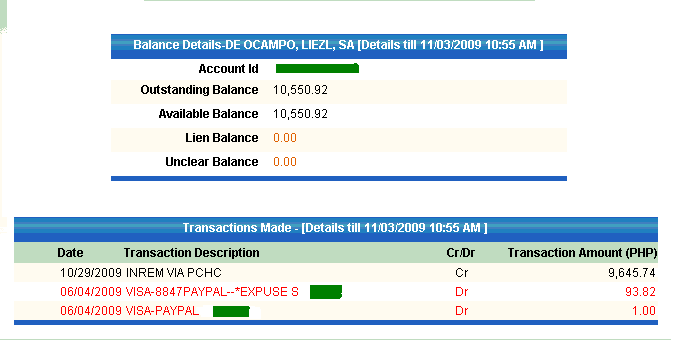
New outstanding balance:

That's my $210 earnings from Odesk!
Know how to withdraw funds from Paypal here...
Wednesday, June 17, 2009
A. Signing up @ paypal.com
- Log on to www.paypal.com and click on SIGN UP.
- Create your PERSONAL account by clicking the "Getting Started" Button.
- Fill up all the required fields in the registration form. Dont worry about linking your credit/debit card. You can always update your account once you have created it.
- Click on "I agree, create my account" button.
- Check your email for confirmation and follow the prompts or log back to www.paypal.com.
- Log on to www.paypal.com and click on SIGN UP.
- Create your PERSONAL account by clicking the "Getting Started" Button.
- Fill up all the required fields in the registration form. Dont worry about linking your credit/debit card. You can always update your account once you have created it.
- Click on "I agree, create my account" button.
- Check your email for confirmation and follow the prompts or log back to www.paypal.com.
B. Applying for EON card (Union Bank)
Currently, the site is not accepting online application so you have to go to the nearest Union Bank branch and apply for EON card.
Union Bank Branch Directory
Make sure you have photocopies of your two valid IDs. Simple, fill up the registration form and wait for 7 BUSINESS DAYS to have your EON card. You can just pay the annual fee of Php350 as you claim it from the bank. I suggest that you also make an initial deposit of atleast Php100 for Paypal verification. Say, Php500 would be enough for this purpose.
*Note: Releasing of EON card may take more than 7 BUSINESS DAYS depending on Bank Policies or the Branch itself.
Once you have your EON card you still have to wait for 24HRS for it to be activated. Proceed to changing PIN.
Register it online for EASE of TRANSACTIONS:
- Go to Union Bank Online and click on "EON CYBER ACCOUNT" option.
- A new window will pop up. Click "ENROLL HERE" to be able to access your accounts online. Again, just follow the prompts for registration.
Once your online account is activated, LINK it to your PAYPAL.
C. LINKING your PAYPAL and EON Cyber Account
- Sign in to your paypal account
- Click the option to LINK your DEBIT CARD
- Complete the required details.
You will then receive a confirmation email like this:

Go back to paypal and you will see this page under your TASKS:

Check your EON Account for the EXPUSE Number:
(You have to click your account and view latest transactions for the details to be displayed.)

;;
Subscribe to:
Posts (Atom)